 continuo
Run dbt and Python projects in continuo
This guide assumes a running continuo on your laptop. If you do not have one yet, start with Instantiate the continuo platform.
You will put four real projects on it — three dbt, one python — release them into continuo, and watch it discover cross-project dependencies from the SQL alone, validate a change against production before promoting it, and refuse a change that would break another team’s model. Everything runs on your machine; no step needs a cloud account until the optional remediation chapter.
You release a project by calling continuo’s release API, /api/v1 on the ui.
Every call carries a bearer token: here, an ID token you mint from the bundled
Dex with the demo account (Get a bearer token, one
command); in a CD pipeline, the pipeline’s GitHub Actions token.
1. Fork the example projects and read them
# Fork https://github.com/carolsimone/continuo-demo-docs on GitHub first,
# then clone your fork:
git clone https://github.com/<your-username>/continuo-demo-docs.git
cd continuo-demo-docs
Fork rather than clone the original, because the code you release has to be code you can change — and, in chapter 8, push.
The repository holds seven services under services/. Three of them —
service-1, service-2, service-3 — are test scaffolding lifted from
continuo’s own end-to-end suite.
Four matter here. core, finance, and marketing are ordinary,
self-contained dbt projects: each with its own dbt_project.yml,
profiles.yml, models, seeds, and Dockerfile. service-py is different — it
is a python-node service, declaring contracts/*.yml and scripts/*.py
instead of dbt models. It onboards through the same POST /api/v1/releases call but a
different artifact, which chapter 4 covers.
You need all four. A dbt model in core reads a table service-py produces, so
releasing only the dbt services leaves the graph with a node that cannot build.
The dependency that makes this interesting
Open services/finance/models/fx_transactions_eur.sql. It converts foreign
currency transactions into euros:
FROM analytics.seed_fx_transactions t
LEFT JOIN analytics.seed_fx_rates_eur r
seed_fx_rates_eur is finance’s own seed. seed_fx_transactions is not —
it belongs to core.
Now open services/core/models/daily_transactions.sql:
FROM {{ ref('seed_card_transactions') }}

UNION ALL

SELECT
    transaction_id,
    user_id,
    amount_eur,
    ...
FROM analytics.fx_transactions_eur
seed_card_transactions is core’s own seed, referenced with ref().
fx_transactions_eur is finance’s model, referenced by its raw
schema-qualified name.
So the real dependency chain runs:
core.seed_fx_transactions → finance.fx_transactions_eur → core.daily_transactions💡 It crosses the project boundary twice. No single dbt run can order it,
because dbt’s ref() only resolves within one project — and neither project
declares the relationship anywhere. continuo infers the whole chain from the
SQL itself, which is the entire point of chapter 3.
The four rules a dbt project must follow
That file also shows the one rule people get wrong. Both reference styles appear in it, deliberately:
- Within a project,
{{ ref('name') }}is optional. Use it if you like — dbt resolves it and orders the intra-project build. continuo does not rely on it: it reads every dependency straight from the compiled SQL. The demo usesref()here only because it is idiomatic dbt. - Across projects, you cannot use
ref(). The other project’s model is not in yours, so aref()to it fails atdbt compilewithdepends on a node named '…' which was not found. Reference it by its raw schema-qualified name —FROM analytics.fx_transactions_eur. continuo finds that edge in the SQL and sequences the cross-project build itself. - Every node needs
meta.owner(set once indbt_project.yml). Nodes without it are skipped.metaalso carries an optional per-node task timeout; see Declare the task timeout of a node. - Every model needs a tag naming its schedule —
{{ config(tags=['daily']) }}. continuo reads the first tag as the schedule the node belongs to; an untagged model is skipped. Seeds are exempt and default to build-on-release. The tag decides which models a schedule runs, not when: a schedule runs on its own once you give it a cron in the UI (Add cron on its card) or withcontinuo schedule set-cron daily "0 1 * * *" Europe/Paris, and until then it runs only when triggered.
The full contract, including the generate_schema_name macro each project
carries, is in
deploy/dbt-image-contract.md.
Declare the task timeout of a node
A node can declare its task timeout in minutes. In a dbt project it is the
timeout_minutes key of the node’s meta. Set it once for the whole project in
dbt_project.yml, and override it on a single model:
# dbt_project.yml
models:
  +meta:
    owner: finance
    timeout_minutes: 60
-- models/fx_transactions_eur.sql
{{ config(meta={'timeout_minutes': 240}) }}dbt resolves project, folder and model meta into each node’s config.meta, so
a model inherits the project value and a model-level timeout_minutes replaces
it; the other meta keys, such as owner, still come from the project.
A python node declares it as timeout_minutes on its contract entry. It may do
so only when both the CLI that builds the contract and the image base the
service’s nodes run in (FROM ghcr.io/carolsimone/continuo-python-runtime-<engine>:v0.10.0
or later) are continuo-python-runtime 0.10.0 or later. With an older image base,
every run of every node of that service fails when it loads its contracts.
# services/service-py/contracts/py_daily_kpis.yml
nodes:
  - schema: analytics
    table: py_daily_kpis
    kind: python-api
    owner: data-team
    schedule: daily
    criticality: SECONDARY
    script: scripts/py_daily_kpis.py
    timeout_minutes: 30
    output_columns:
      - {name: kpi_date, type: DATE, nullable: false}
The value is an integer from 1 to 10,080 minutes (seven days). continuo
validates it at release time: anything else, a string such as "2h", zero, a
negative number or a larger one, rejects the release as invalid_artifact, and
the rejection names the node and the key.
continuo records the timeout with each release, and a run keeps the timeouts of
the release it runs on. The timeout is not part of a node’s content hash, so a
release that changes only timeouts promotes without validation. A node that
declares none gets the install’s default, runs.taskTimeoutHours (24 hours
unless your operator changed it). The node page shows the timeout a node’s tasks
get and whether it is declared or the default, and continuo node list reports
it as timeout_seconds with timeout_declared.
When a task runs past its timeout, Kubernetes stops its Job and the attempt fails
as timeout deadline_exceeded. A timed-out task is not retried: it fails, and
the tasks below it in the run are skipped. The deadline adds the time a pod may
take to start (execution.startTimeoutMinutes, 15 minutes unless your operator
changed it) to the timeout, so a container always gets at least its whole
timeout, however long its pod waited to be scheduled. A pod that starts no
container within that start time fails as timeout start_timeout, also without
a retry.
If your project already has its own generate_schema_name
The four demo projects each ship continuo’s generate_schema_name unchanged, so
you never meet this problem here. A real project often already defines its own —
a custom schema layout is one of the most common dbt overrides. dbt uses the
project’s macro over any packaged one, so dropping continuo’s file in next to
yours does nothing: yours still wins, and validation would materialize into your
production-computed schema instead of the isolated candidate schema.
Do not replace your macro. Add continuo’s branch as the first check and leave your existing logic untouched below it:
{% macro generate_schema_name(custom_schema_name, node) -%}
    {%- set override = env_var('DBT_TARGET_SCHEMA', '') -%}
    {%- if override | length > 0 -%}
        {{ override }}
    {%- else -%}
        {# your existing schema logic, unchanged #}
    {%- endif -%}
{%- endmacro %}
DBT_TARGET_SCHEMA is set only on continuo’s validation leg. On your production
runs it is unset, control falls straight through to your logic, and your output
is exactly the same as today — you are only teaching the macro one new rule:
when this variable is set, honour it.
💡 The one thing to check: if you already use an env var named
DBT_TARGET_SCHEMA for your own purposes, rename one of them so the two don’t
collide.
2. Build the images and load them into the cluster
continuo runs your project by running your image as a Kubernetes Job, so each service needs to be built and made visible to the cluster. That is true of the python service too — it ships as an image exactly like the dbt ones:
for svc in core finance marketing service-py; do
  docker build -t "${svc}:v1" "services/${svc}"
  kind load docker-image "${svc}:v1" --name continuo
done
Confirm the node can see all four:
docker exec continuo-control-plane crictl images | grep -E "library/(core|finance|marketing|service-py)"❯ docker exec continuo-control-plane crictl images | grep -E "library/(core|finance|marketing|service-py)"
docker.io/library/core v1 a2bd307ad3117 91.6MB
docker.io/library/finance v1 1ec4742c92b1f 91.3MB
docker.io/library/marketing v1 862b724af6a23 91.3MB
docker.io/library/service-py v1 cca6848b33e87 124MBWhy a bare core:v1 works. The chart value global.teamImagePrefix is empty
by default, which tells continuo’s execution-controller to resolve dbt job images as an
unprefixed <service>:<image_tag>, and it launches them with
imagePullPolicy: IfNotPresent. So the image you already loaded onto the node
with kind load is the one it runs, and nothing is ever pulled from a registry.
Set teamImagePrefix to
your Docker Hub or registry namespace when you move to a real cluster, and the
same mechanism resolves yourteam/core:v1 instead.
The tag v1 is arbitrary — it just has to match what you send in the next
chapter. Real CD systems use the commit SHA. (The python service’s release
body needs the full service-py:v1 reference rather than the bare tag —
chapter 4 explains why.)
3. Release first dbt project to platform: bootstrap
Get a bearer token
continuo’s release API is public: it is served by the ui at /api/v1, behind
the same login as the dashboard, so a pipeline needs nothing but the URL and a
token. Forward the ui and the identity provider (skip this if the port-forwards
from the install guide are still running), then ask the identity provider for
an ID token with the demo account’s password:
kubectl -n continuo port-forward svc/ui 8090:8090 &
kubectl -n continuo port-forward svc/continuo-dex 5556:5556 &

CLIENT_SECRET=$(kubectl -n continuo get secret continuo-dex -o jsonpath='{.data.client-secret}' | base64 -d)
TOKEN=$(curl -s -u "continuo-ui:${CLIENT_SECRET}" http://localhost:5556/dex/token \
  -d grant_type=password -d scope="openid email profile" \
  -d [email protected] -d password=password | jq -r .id_token)
export API=http://localhost:8090/api/v1
If echo $TOKEN prints null, the login failed: check that the Dex
port-forward is running and that the password is right.
That token is your own, as an operator, and it is valid for one hour: when a
call answers 401, run the TOKEN=... command again. A CD pipeline does not
log in as a person; it presents its GitHub Actions token instead, as
Releasing from CI
describes.
Bootstrap the first project
One word before the first call. Production, here and everywhere in this guide, is continuo’s term for the promoted side of its blue/green release pair — the set of tables the schedules serve, the thing a release is validated against and promoted into. It is not a claim about where you are: on your laptop, production is a schema in the bundled Postgres, and nothing in this walkthrough leaves your machine. In a real install it is your warehouse, and every mechanism below behaves identically — which is the point of trying them here.
Ask production what it is currently running:
curl -s -H "Authorization: Bearer $TOKEN" $API/current-prod | jq{
"current_prod_release_id": "",
"node_count": 0,
"updated_at": "0001-01-01T00:00:00Z"
}An empty current_prod_release_id means production has never been seeded, and
this first release must bootstrap: promote without validation. That is not a
shortcut — against an empty production, every cross-service dependency looks
like a new one, so normal validation would reject everything. Real CD detects
this the same way, by reading this endpoint.
curl -s -X POST $API/releases \
  -H "Authorization: Bearer $TOKEN" \
  -H 'content-type: application/json' \
  -d '{
    "release_id": "rel-core-v1",
    "service": "core",
    "image_tag": "v1",
    "bootstrap": true,
    "repo": "<your-username>/continuo-demo-docs",
    "commit_sha": "'"$(git rev-parse HEAD)"'"
}' | jq{"release_id": "rel-core-v1", "status": "received"}💡 Note what you did not send: no manifest, no list of models, no DAG, no S3
upload. One service, one image tag. continuo derives the rest. The repo and
commit_sha fields say where the release came from; with your own token you
supply them, while a GitHub Actions token carries them itself.
Watch it:
curl -s -H "Authorization: Bearer $TOKEN" $API/releases/rel-core-v1 | jq '{status, terminal}'The answer carries the release’s current status and a terminal flag that
turns true once the release is promoted, rejected, or superseded; a
pipeline polls until it does. Within about half a minute this release reaches
promoted, having walked:
received → compiling → parsing → validating → promotedWhat just happened
Those statuses are the whole pipeline, and each one is a different service:
compiling — release-controller published a request that
execution-controller turned into a Kubernetes Job running your core:v1
image. That Job ran dbt compile against your project and uploaded the
resulting manifest.json to the bundled MinIO. This is why the release body
carries no manifest: continuo compiles your project itself, using the same image
it will later run your models with, so what gets analysed is exactly what will
execute.
parsing — topology-controller read that manifest and worked out the
shape of your project: which nodes exist, what each one reads, and what its
content hashes to. Cross-project dependencies are resolved here by parsing the
compiled SQL with sqlglot — this is the step that discovers FROM analytics.fx_transactions_eur is an edge in the graph.
validating → promoted — bootstrap skips the actual validation, so these
are the same instant. Chapter 6 is where validation happens for real.
Then, on promotion, continuo materialises the release’s seeds into production.
Check the result in the UI: core now has eight nodes — three seeds and five
models — joined by four edges. Three of them are {{ ref() }} calls
(seed_card_transactions → daily_transactions → revenue_per_user, and
seed_users → revenue_per_user); the fourth, read_order → read_order_v2,
is a raw FROM analytics.read_order, which is rule 1 at work: inside a project
continuo reads the edge from the SQL whether or not you use ref().
Every edge is inside core. The cross-project half of the chain is not there
yet, because finance doesn’t exist yet, and dbt_daily_kpis and read_order
read tables from services you have not released. Nothing is broken; the graph
simply reflects what has been released.
4. The remaining releases: bootstrap them all
The obvious next step — release marketing normally and let it validate — does
not work yet, and the reason teaches you how validation actually operates. Two
rules collide on a first install:
- Validation clones what a change reads from production. To prove a release against real structure, continuo builds a temporary candidate schema by cloning the release’s unchanged upstream tables from production — so those tables must already physically exist.
- Promotion materialises only seeds. Models become real tables when a run executes them (chapter 5), not at promotion.
You have promoted core, but nothing has run: core’s models do not exist as
tables yet. Validate any service that reads them and the clone step fails with
relation "analytics.daily_transactions" does not exist — continuo refusing to
prove a change against tables that are not there. No release order escapes
this, because the demo’s services read from each other in both directions
(core ↔ finance, core ↔ service-py): whichever service you validate first needs
another one’s models materialised, and that needs a run.
So a cold install is seeded the way production was born: every service’s
first release is a bootstrap. Promote all four without validation, run the
graph once so every model physically exists, and from then on validation has a
production to clone from. This chapter is the last time you will pass
"bootstrap": true; every release after it is validated for real.
💡 Order among the remaining three does not matter. Every release reparses the full set of promoted manifests plus its own, so the edge between two services appears as soon as both have been released — whichever release comes last completes the DAG.
Releases run a FIFO queue: one is active at a time, and each terminal
outcome advances the next. Post them one at a time and wait for each to reach
promoted; a release that never finishes blocks everything behind it.
marketing first:
curl -s -X POST $API/releases \
  -H "Authorization: Bearer $TOKEN" \
  -H 'content-type: application/json' \
  -d '{
    "release_id": "rel-marketing-v1",
    "service": "marketing",
    "image_tag": "v1",
    "bootstrap": true,
    "repo": "<your-username>/continuo-demo-docs",
    "commit_sha": "'"$(git rev-parse HEAD)"'"
  }' | jq
Like core’s, it promotes in about half a minute. Release finance the same
way:
curl -s -X POST $API/releases \
  -H "Authorization: Bearer $TOKEN" \
  -H 'content-type: application/json' \
  -d '{
    "release_id": "rel-finance-v1",
    "service": "finance",
    "image_tag": "v1",
    "bootstrap": true,
    "repo": "<your-username>/continuo-demo-docs",
    "commit_sha": "'"$(git rev-parse HEAD)"'"
  }' | jq
Once it promotes, all three dbt projects are live — and the UI now shows the cross-project edges from chapter 1, discovered from the SQL alone.
The fourth service is a python runtime (no dbt)
service-py onboards differently in one way: you upload its artifact
yourself. In production, your CD pipeline does this.
A dbt service has a compile leg — the compiling stage above ran dbt compile
and produced the manifest for you. A python service has none. So you build its
contract and upload it to object storage before you post the release.
Here you do that by hand. It is the same sequence your own CD will run.
One file first. service-py declares two nodes. py_daily_kpis runs a
Python script against the warehouse. demo_orders_csv is a python-csv node:
no script at all — the runtime loads a CSV file straight from object storage
and writes it through as a table. Its contract points at that file by its
object-store URL, in your install’s own bucket:
# services/service-py/contracts/demo_orders_csv.yml
    reads:
      csv: s3://continuo/static-files/demo/orders.csv
continuo is the bucket the bundled MinIO creates, so the URL is right as
shipped; only the file is missing. Put one there. Your install’s object store is
the bundled MinIO, which speaks the S3 API — so the standard AWS CLI drives it.
Install the CLI if you don’t have it (brew install awscli on macOS, or the
AWS CLI install guide),
then port-forward MinIO and point the CLI at it:
kubectl -n continuo port-forward svc/continuo-minio 9000:9000 &

export AWS_ACCESS_KEY_ID=$(kubectl -n continuo get secret continuo-minio \
  -o jsonpath='{.data.access-key-id}' | base64 -d)
export AWS_SECRET_ACCESS_KEY=$(kubectl -n continuo get secret continuo-minio \
  -o jsonpath='{.data.secret-access-key}' | base64 -d)
export AWS_DEFAULT_REGION=us-east-1

cat > /tmp/orders.csv <<'EOF'
order_id,customer,amount
1001,acme,120.50
1002,globex,80.00
1003,initech,42.25
EOF

aws --endpoint-url http://localhost:9000 \
  s3 cp /tmp/orders.csv s3://continuo/static-files/demo/orders.csv
Now build the contract from the service’s contracts/ directory, using the
runtime CLI the release gate uses (a service’s image base must be on the same
runtime release or later to run a contract that declares timeout_minutes):
uv tool install continuo-python-runtime==0.10.0

continuo-runtime validate services/service-py/contracts --dialect postgres

continuo-runtime merge services/service-py/contracts \
  --service service-py \
  --repo-root services/service-py \
  --dialect postgres \
  --out /tmp/contract.yaml
Then upload it to the canonical key, <service>/<release_id>/contract.yaml —
the same aws s3 cp your CD runs, aimed at the MinIO you forwarded a moment
ago:
aws --endpoint-url http://localhost:9000 \
  s3 cp /tmp/contract.yaml s3://continuo/service-py/rel-py-v1/contract.yaml
Only now post the release, with one extra field — "kind": "python" — telling
continuo to skip the compile leg and read the contract you just uploaded. Note
the image_tag. For a dbt release you pass the bare tag (v1) and continuo
builds the full image reference itself. For a python release, image_tag is
the full image reference — continuo uses it exactly as written and adds
nothing. So pass service-py:v1, not v1, or the node cannot be dispatched at
run time:
curl -s -X POST $API/releases \
  -H "Authorization: Bearer $TOKEN" \
  -H 'content-type: application/json' \
  -d '{
    "release_id": "rel-py-v1",
    "service": "service-py",
    "image_tag": "service-py:v1",
    "bootstrap": true,
    "kind": "python",
    "repo": "<your-username>/continuo-demo-docs",
    "commit_sha": "'"$(git rev-parse HEAD)"'"
  }' | jq
If you post this before the upload, the release parks in parsing and stays
there: the parse is retrying against a 404 for an object that does not exist.
Open the platform UI and the new service-py node now appears in the topology.
python-api nodes
A python-api node’s script fetches its own data, usually over HTTP. It
declares no reads:, so it has no upstream edges and runs first in its DAG.
nodes:
  - schema: analytics
    table: fx_eur_usd_rates
    kind: python-api
    owner: data-team
    schedule: daily
    criticality: SECONDARY
    script: scripts/fx_eur_usd_rates.py
    secret_ref: continuo-api-fx      # optional
    output_columns:
      - {name: rate_date, type: DATE, nullable: false}
      - {name: rate, type: DOUBLE PRECISION, nullable: false}
If the API needs a key, name a Secret with secret_ref. The name must start
with continuo-api-. Every key in that Secret reaches the script as an env var
(os.environ["FX_API_KEY"]). The contract holds only the Secret’s name, never
a value. The Secret lives in the namespace execution-controller runs Jobs in
(its K8S_NAMESPACE, which the chart sets to the release namespace):
- kubectl:
kubectl create secret generic continuo-api-fx --from-literal=FX_API_KEY=<key> -n <job-namespace> - External Secrets Operator: an
ExternalSecretwhosespec.target.nameiscontinuo-api-fx. - Vault Secrets Operator: a
VaultStaticSecretwhosespec.destination.nameiscontinuo-api-fx.
If the Secret is missing when the node runs, the run fails at pod start with
CreateContainerConfigError. Validation never runs the script and never needs
the Secret. Warehouse credentials always win over a key of the same name in an
API Secret.
The graph you have built
Four services, stitched into one graph, from four API calls that each named a single service — and the chain crosses both project and runtime boundaries:
core.seed_fx_transactions   →  finance.fx_transactions_eur   (dbt → dbt)
core.daily_transactions     →  service-py.py_daily_kpis      (dbt → python)
service-py.py_daily_kpis    →  core.dbt_daily_kpis           (python → dbt)
marketing.marketing_cost_per_user → finance.ltv_per_user     (dbt → dbt)
💡 The middle two are the interesting pair: a Python job reads a table dbt built, and a dbt model reads the table that Python job wrote. Neither project declares the other. continuo derived the ordering from the SQL and the contract.
5. Run it
Open the UI, pick the daily schedule, and press ▶ Trigger run.
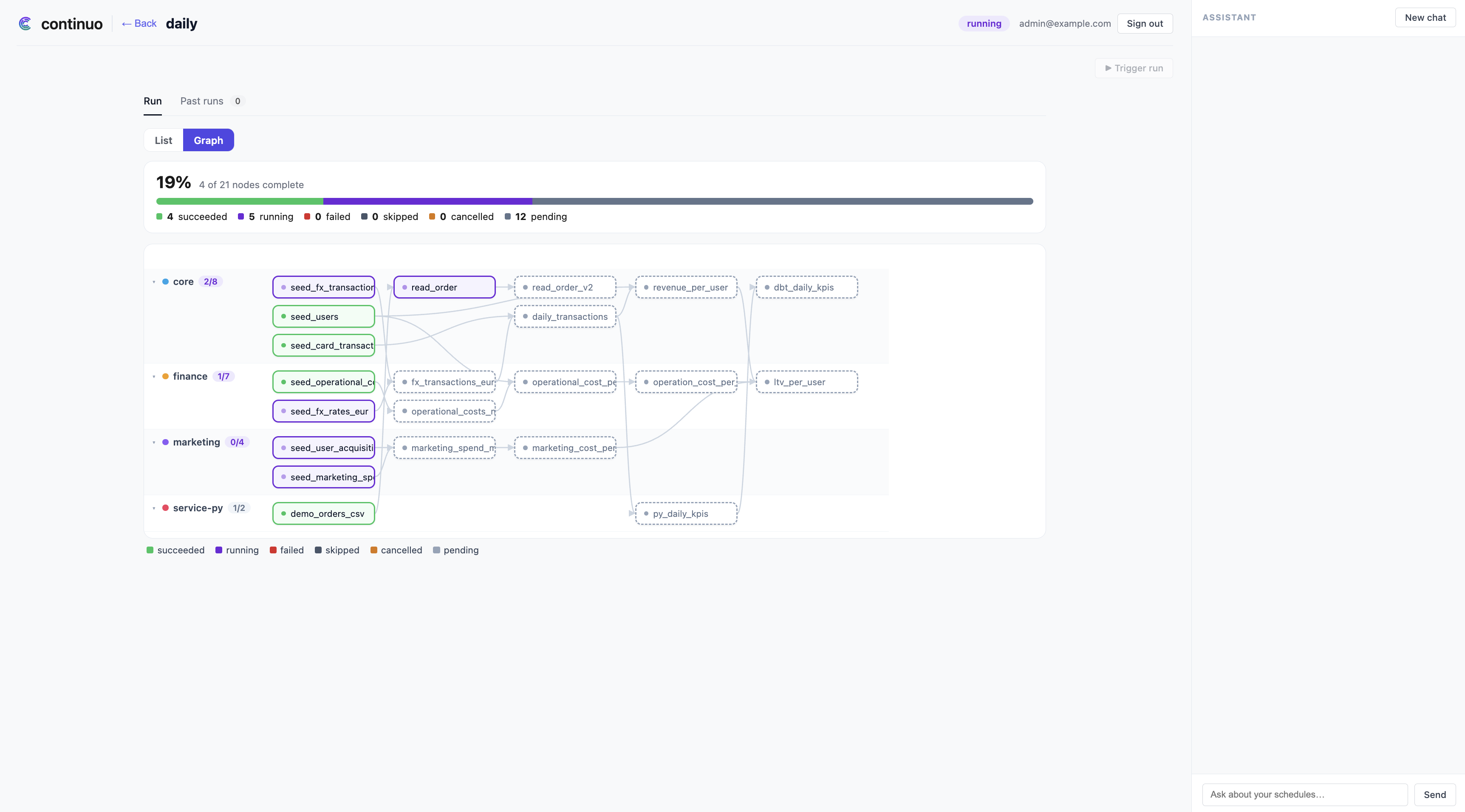
You will see nodes move through the graph as continuo dispatches each one as its own Kubernetes Job, in dependency order, across all four services — including the hop through the python one. Watch it from the cluster side too if you like:
kubectl -n continuo get jobs -w💡 Seeds build first, then finance.fx_transactions_eur (which needs core’s
seeds), then core.daily_transactions (which needs finance’s model). The
ordering crosses project boundaries in both directions — which is precisely the
ordering no single dbt run could have produced.
Click any node to see its execution log.
When the run finishes, every node should be green. Now look at the actual result:
PGPW=$(kubectl -n continuo get secret continuo-postgresql -o jsonpath='{.data.password}' | base64 -d)
kubectl -n continuo exec continuo-postgresql-0 -- env PGPASSWORD="$PGPW" \
  psql -U continuo -d continuo_dbt -c \
  "select source, count(*) as rows, round(sum(amount_eur)) as total_eur
     from analytics.daily_transactions group by source order by source"
source | rows | total_eur
--------+------+-----------
card | 7208 | 5091176
fx | 4786 | 38852881💡 One table, two halves. The card rows came from core’s own seed through a
{{ ref() }}. The fx rows arrived via finance’s fx_transactions_eur, a model
in a different dbt project, built by a different image, released separately —
reached by nothing more than FROM analytics.fx_transactions_eur.
This run also unlocked validation. Every model in the graph now exists as a real production table — which is exactly what chapter 6’s release will be proven against.
6. Add a model, watch validation work
Everything on the platform so far went in through the bootstrap door. Now do what a team does on an ordinary Tuesday: add one model and release it — this time with validation on.
The model computes each marketing channel’s return on spend, and its input is
ltv_per_user — a model that belongs to finance. Create
services/marketing/models/channel_roi.sql:
{{ config(materialized='table', tags=['daily']) }}

-- Per-channel return on marketing spend: lifetime contribution earned per
-- euro spent. analytics.ltv_per_user is produced by the finance project and
-- is referenced by its raw schema-qualified name (see "the four rules").
SELECT
    channel,
    COUNT(*)                                   AS users,
    ROUND(SUM(contribution_margin_eur), 2)     AS contribution_eur,
    ROUND(SUM(marketing_cost_eur), 2)          AS spend_eur,
    ROUND(SUM(contribution_margin_eur) / NULLIF(SUM(marketing_cost_eur), 0), 2)
        AS roi
FROM analytics.ltv_per_user
GROUP BY channel
Build it, load it, release it — from here on, bootstrap is false:
docker build -t marketing:v2 services/marketing
kind load docker-image marketing:v2 --name continuo

curl -s -X POST $API/releases \
  -H "Authorization: Bearer $TOKEN" \
  -H 'content-type: application/json' \
  -d '{
    "release_id": "rel-marketing-v2",
    "service": "marketing",
    "image_tag": "v2",
    "bootstrap": false,
    "repo": "<your-username>/continuo-demo-docs",
    "commit_sha": "'"$(git rev-parse HEAD)"'"
  }' | jq
The stages are the same ones every release walks — but this time validating
is not instant. It runs for a minute or two, and this is the
blue/green mechanism at work: continuo created a temporary candidate schema,
built the release’s seeds into it, cloned the unchanged upstream tables the
change reads from production — this is why chapter 4 had to bootstrap —
rewrote the in-scope models’ compiled SQL to read from that schema instead of
production, and ran them there. Production was untouched throughout, and the
candidate schema was torn down afterwards. No data is copied — only
schema-level structure.
Look at what was in scope. The public API reports a release’s outcome, not its internals, so read it from the dashboard’s own release route, which accepts the same token:
curl -s -H "Authorization: Bearer $TOKEN" \
  http://localhost:8090/api/releases/rel-marketing-v2 | jq '.validation_node_ids'
[
"analytics.channel_roi",
"analytics.daily_transactions",
"analytics.fx_transactions_eur",
"analytics.ltv_per_user",
"analytics.marketing_cost_per_user",
"analytics.marketing_spend_monthly",
"analytics.operational_cost_per_user",
"analytics.operational_costs_monthly",
"analytics.revenue_per_user",
"analytics.seed_card_transactions",
"analytics.seed_fx_rates_eur",
"analytics.seed_fx_transactions",
"analytics.seed_marketing_spend",
"analytics.seed_operational_costs",
"analytics.seed_user_acquisition",
"analytics.seed_users"
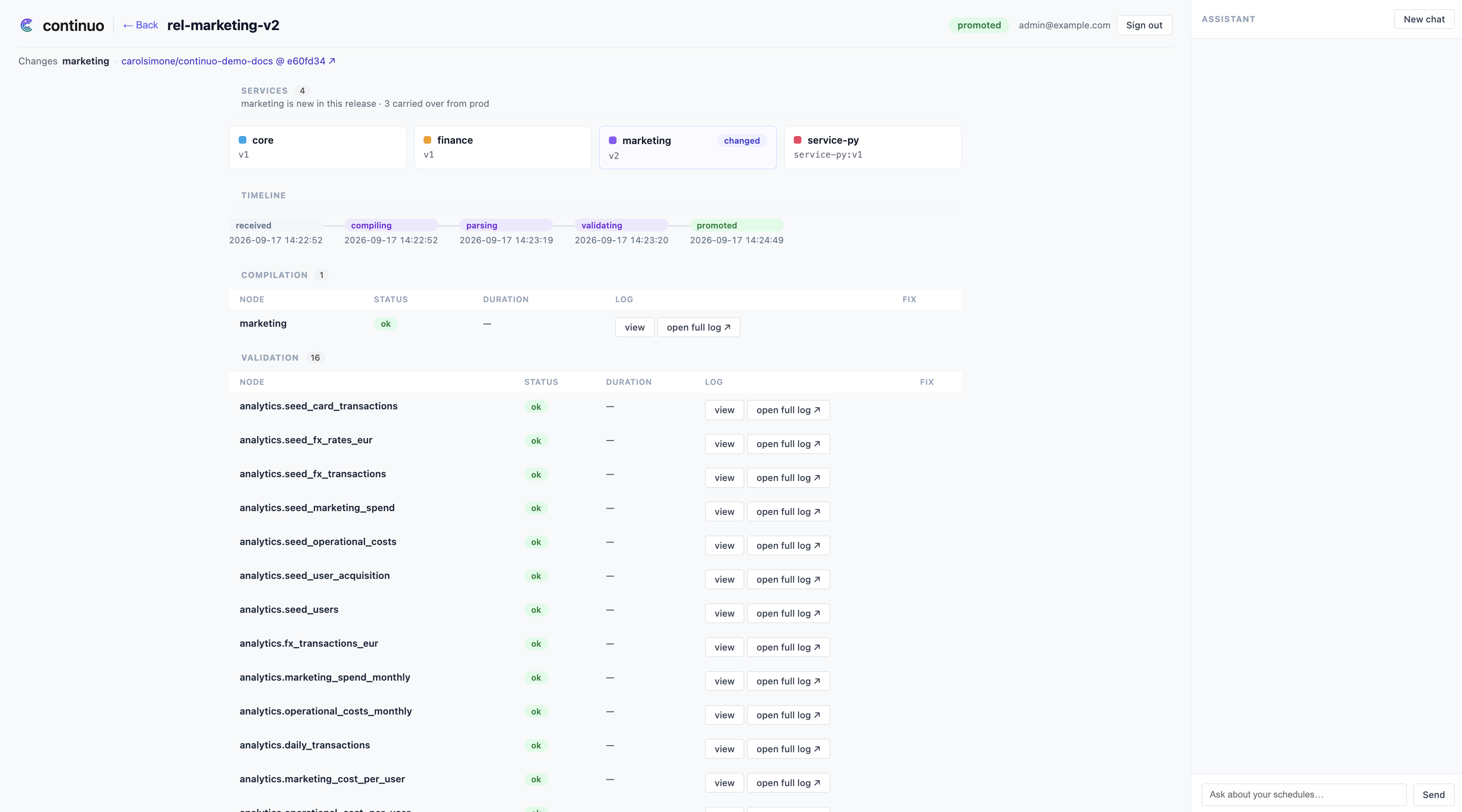
]💡 Read that list again. You added one model to marketing. continuo put
sixteen of the graph’s twenty-two nodes in scope: your new node and its entire
upstream lineage — ltv_per_user from finance, revenue_per_user and
daily_transactions from core, and the seeds under all of them. You changed
marketing; continuo worked out from the SQL that proving the change requires
two other teams’ models, cloned their production structure, and ran your model
against it. Nobody declared those relationships anywhere.
Only because all of that passed did marketing:v2 become marketing’s
production image. In the UI, the graph now shows channel_roi downstream of
finance’s ltv_per_user — a node that exists but has never run.
7. Break it on purpose
Everything so far has worked. The point of continuo is what happens when something doesn’t.
core.daily_transactions selects amount_eur from finance’s table. Take that
column away by renaming it. Edit
services/finance/models/fx_transactions_eur.sql and change the one amount_eur
line — keep the trailing comma, because you are swapping a column expression,
not deleting a line:
-- before
    ROUND((t.amount * r.rate_to_eur)::numeric, 2)     AS amount_eur,
-- after
    r.rate_to_eur AS unused_placeholder,
⚠️ The comma matters. Drop it — or comment the old line out and add a new one
without it — and the SELECT becomes invalid SQL. That is caught at the parse
stage instead (reject_reason: invalid_sql), which is healable too — continuo
proposes a fix for it — but it is a duller failure than the one this chapter is
about. With the comma kept, the model still compiles: it is valid SQL, finance’s
own tests pass, and the damage lands entirely in another team’s project.
Build and release it:
docker build -t finance:v2 services/finance
kind load docker-image finance:v2 --name continuo

curl -s -X POST $API/releases \
  -H "Authorization: Bearer $TOKEN" \
  -H 'content-type: application/json' \
  -d '{"release_id":"rel-finance-v2","service":"finance","image_tag":"v2",
       "bootstrap":false,"repo":"<your-username>/continuo-demo-docs",
       "commit_sha":"'"$(git rev-parse HEAD)"'"}' | jq
This time it ends differently:
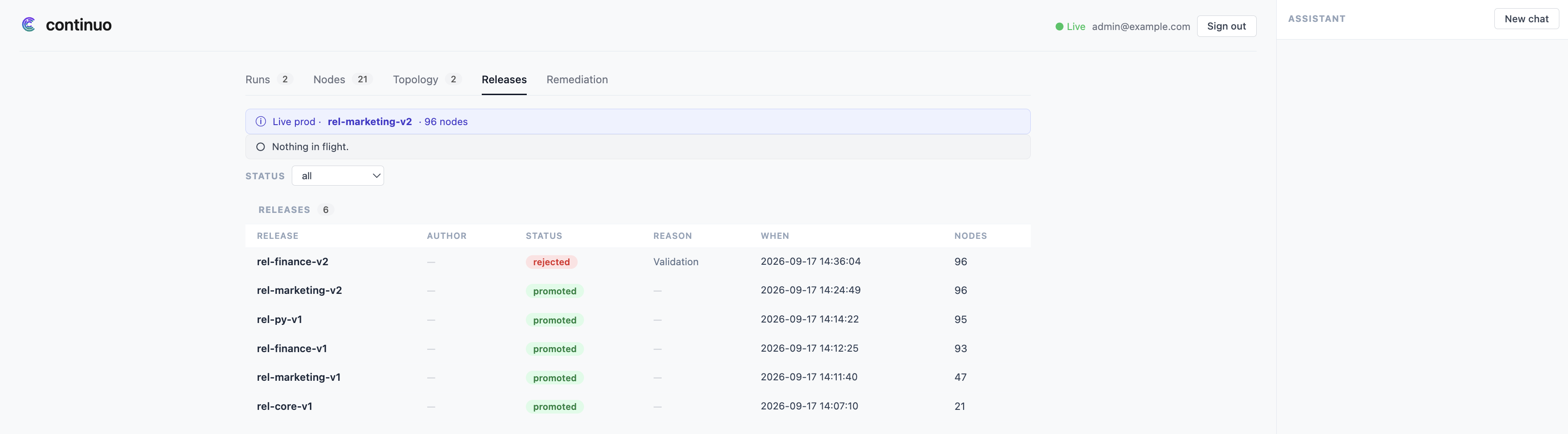
💡 The release was rejected, and look at where the damage landed: models in
core, the channel_roi you added to marketing in the previous
chapter, finance’s own ltv_per_user, and even service-py’s python node —
everything downstream of the column you removed, across all four projects and
both runtimes. You touched one file in finance.
Now check production:
curl -s -H "Authorization: Bearer $TOKEN" $API/current-prod | jq '.current_prod_release_id'Still rel-marketing-v2, the release chapter 6 promoted. Production never saw
finance:v2. The daily schedule will keep running the last version that
passed, indefinitely, and its next run, triggered or fired by its cron, will
produce correct data.
💡 This is the part that is hard to get any other way. In a conventional setup this
change merges, deploys, and breaks core the next time it runs — and the person
who gets paged is on the core team, looking at a model they did not change.
Here, the failure surfaced against the person who made the change, before it
reached production, in another team’s model they had never heard of.
8. Let the agent propose a fix
This chapter needs credentials chapters 1–7 did not.
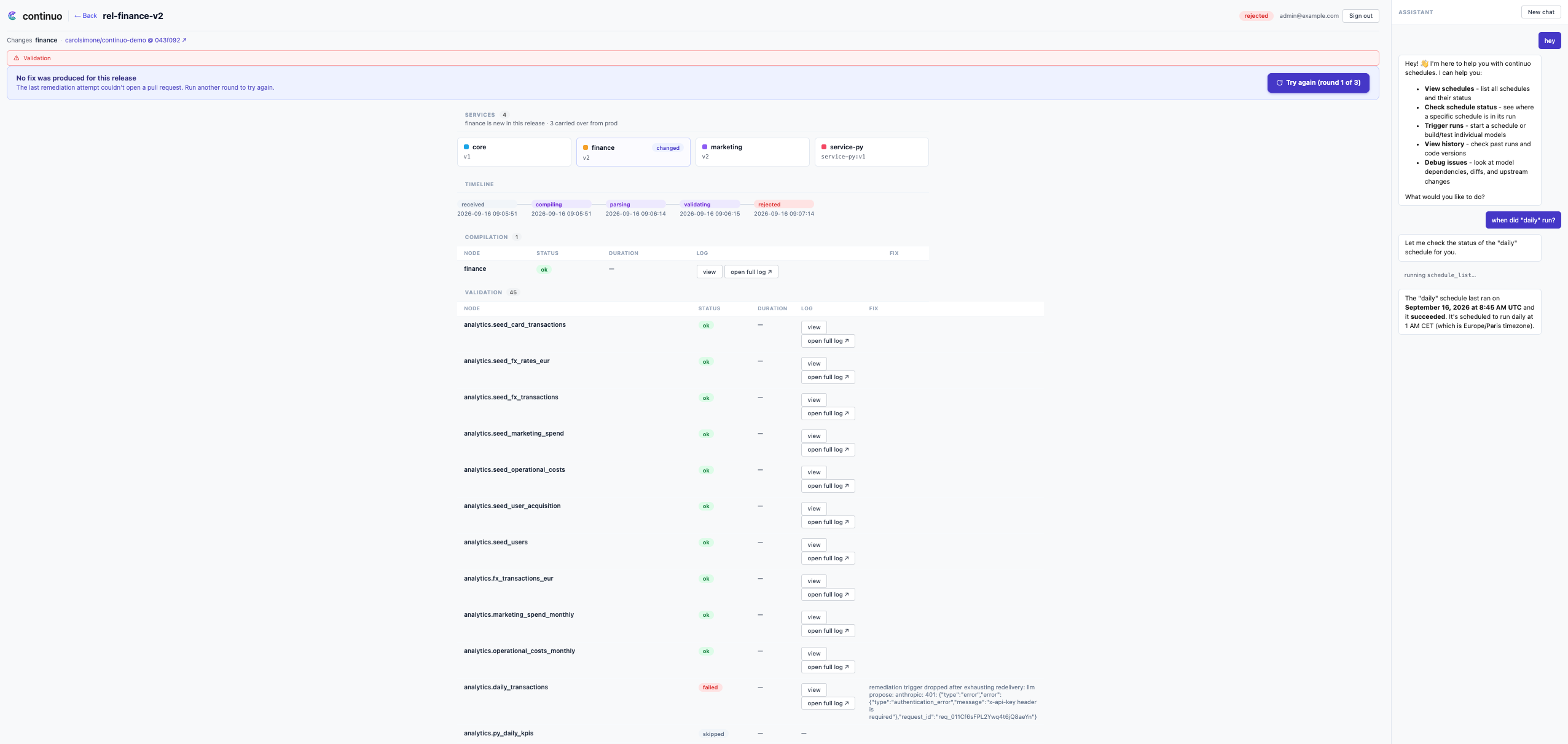
A rejected release tells you something broke. continuo can also try to fix it.
💡 remediation classifies the rejection, and for a fixable one agent-remediation
reads the failing model’s source, asks an LLM for a fix, and surfaces
the proposal for a human to approve. It never writes to your repository on its
own — the output is a diff you review, and a pull request you choose to open.
Where the agent reads your source. For a dbt model that failed validation —
this chapter’s case — it reads the code continuo captured when it compiled the
release, so nothing has to be on GitHub to get a proposal. For failures caught
before validation (compile errors, seeds, duplicate tables) and for python
nodes, it reads your fork through the GitHub API at repo@commit_sha. That read
works without a token on a public fork; a read-only token is what lets it read
a private one.
There are two credential tiers, and they unlock two different things:
| You provide | You get | Value keys |
|---|---|---|
| LLM API key (plus a read-only GitHub PAT for a private fork) | See the proposed fix in the UI | llm.apiKey, github.token |
| GitHub App (id, installation id, private key) | Open the PR from the UI | github.appId, github.installationId, github.appPrivateKey |
Do the first tier now. The second is its own section below, and you can stop after the first if you only want to see the proposal.
See the proposal
The proposal is anchored to a commit in your repository, and the pull request in the next section is opened against it, so commit and push your broken change to your fork:
git add services/finance && git commit -m "break amount_eur" && git pushOptional: create a read-only PAT. Skip this on a public fork. github.token
is a GitHub fine-grained personal access token that agent-remediation uses for
the GitHub reads above. Create one once:
- Open the token page. GitHub → your avatar → Settings → Developer settings → Personal access tokens → Fine-grained tokens → Generate new token.
- Name and scope it. Give it any name, set an expiration, and under
Repository access choose Only select repositories → your
continuo-demo-docsfork. - Grant read-only contents. Under Repository permissions, set Contents: Read-only. Leave every other permission at No access — that is all continuo needs.
- Generate and copy it. Click Generate token and copy the value; GitHub
shows it once. That string is your
github.token.
Then set the LLM key (and the PAT, if you made one), and upgrade:
helm upgrade continuo oci://ghcr.io/carolsimone/charts/continuo \
  --version 0.18.0 -n continuo --reuse-values \
  --set llm.apiKey='<your-api-key>' \
  --set github.token='<your-read-only-PAT>'   # drop this line without a PAT
llm.provider defaults to anthropic and llm.model to claude-haiku-4-5. For
OpenAI, add --set llm.provider=openai --set llm.model=<model>.
--reuse-values preserves anything you set at install; if you installed on pure
defaults you can drop it.
Then restart the agent so it picks the credentials up — the upgrade changes only the Secret, and a Secret change alone does not restart the pod that reads it at startup:
kubectl -n continuo rollout restart deploy/agent-remediationRe-release the broken finance under a new release_id, carrying the commit you
just pushed:
curl -s -X POST $API/releases \
  -H "Authorization: Bearer $TOKEN" \
  -H 'content-type: application/json' \
  -d '{"release_id":"rel-finance-v3","service":"finance","image_tag":"v2",
       "bootstrap":false,"repo":"<your-username>/continuo-demo-docs",
       "commit_sha":"'"$(git rev-parse HEAD)"'"}' | jq
The release must fail on valid SQL to exercise the validation classifier —
the one this chapter is about. Invalid SQL never reaches validation: it is
rejected earlier, at the parse stage as invalid_sql, and healed by the parse
lane instead (this is the comma trap from chapter 7). About a minute after
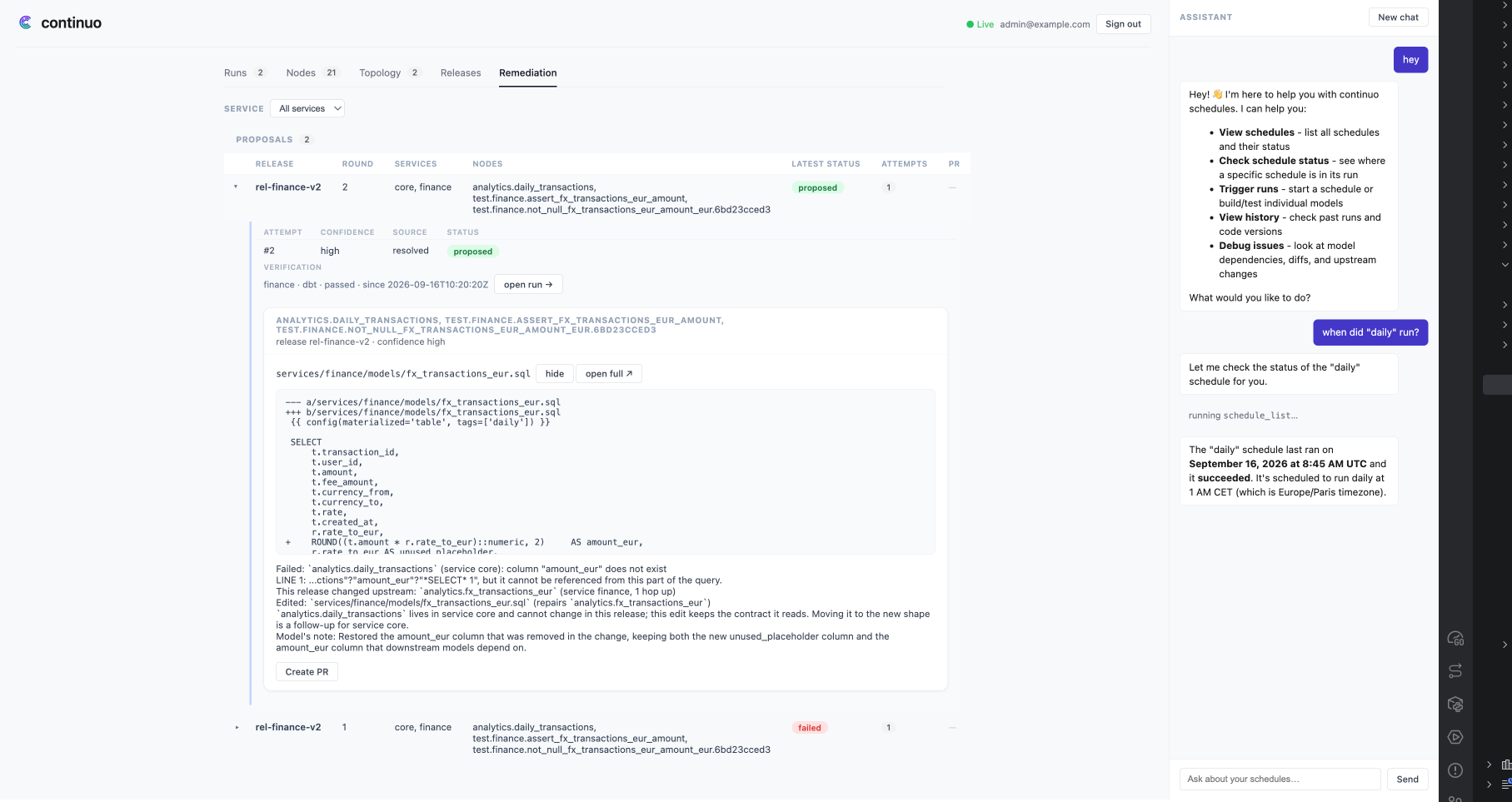
rel-finance-v3 is rejected, the proposed fix appears in the UI against it: a
diff that restores amount_eur, already proven by a real verification run.
rel-finance-v2 from chapter 7 gets a proposal too — its rejection was waiting
for the agent to have a key.
Open the PR (GitHub App)
Seeing the proposal needs only the read PAT above. Creating the PR from the UI needs a GitHub App: the UI’s Open PR action returns 503 until one is configured. A PAT cannot do this — the PR is opened as an App installation, not as you.
Set one up once:
- Create the App. GitHub → your avatar → Settings → Developer settings →
GitHub Apps → New GitHub App. Give it any name (e.g.
continuo-remediation) and any Homepage URL (your fork’s URL is fine). Under Repository permissions, grant Contents: Read and write and Pull requests: Read and write. Untick Webhook → Active (continuo receives no webhooks). Click Create GitHub App. - Copy the App ID. On the app’s page, the App ID is your
github.appId. - Generate a private key. Same page → Private keys → Generate a private
key. A
.pemfile downloads — that file is yourgithub.appPrivateKey. - Install the App on your fork. App page → Install App → install on your
account → Only select repositories → your
continuo-demo-docsfork. - Copy the Installation ID. After installing, the browser URL ends in
/installations/<number>— that number is yourgithub.installationId.
Then upgrade with all three. The App ID and installation ID are numbers, but the
chart takes them as strings, so pass them with --set-string (plain --set turns
them into numbers and the upgrade fails schema validation). The private key is a
file, not a flag value (a PEM has newlines that --set mangles), so pass it with
--set-file:
helm upgrade continuo oci://ghcr.io/carolsimone/charts/continuo \
  --version 0.18.0 -n continuo --reuse-values \
  --set-string github.appId='<app-id>' \
  --set-string github.installationId='<installation-id>' \
  --set-file github.appPrivateKey=/path/to/downloaded-key.pem
The App credentials are read by the ui, which creates the PR — so restart that deployment, not the agent:
kubectl -n continuo rollout restart deploy/uiThe Open PR button on the proposal now opens a real pull request against your fork.
9. Run it again
One green run proved the graph you bootstrapped. Close the loop by proving the graph as it stands now — new node included, broken release excluded.
Open the UI, pick the daily schedule, and press ▶ Trigger run again.
The run picks up channel_roi as just another node: downstream of finance’s
ltv_per_user, so it is dispatched after it, across the same four services.
The rejected finance:v2 is nowhere in it — production still runs the finance
that passed.
When it finishes green, read your new model’s answer:
PGPW=$(kubectl -n continuo get secret continuo-postgresql -o jsonpath='{.data.password}' | base64 -d)
kubectl -n continuo exec continuo-postgresql-0 -- env PGPASSWORD="$PGPW" \
  psql -U continuo -d continuo_dbt -c \
  "select channel, users, spend_eur, roi from analytics.channel_roi order by roi desc"
channel | users | spend_eur | roi
------------+-------+-----------+------
organic | 310 | 0.00 |
referral | 390 | 9750.00 | 3.38
google_ads | 709 | 18585.46 | 3.03
meta_ads | 324 | 11248.70 | 2.35
tiktok_ads | 190 | 7888.94 | 2.08
email | 39 | 1591.56 | 1.75
affiliate | 38 | 7939.07 | 0.41💡 That is the whole loop: four projects released independently, one graph derived from their SQL, a new model validated against production before it could touch it, a bad change stopped at the same gate, and a run that crosses team boundaries in the right order every time.
10. Clean up
kind delete cluster --name continuoThat removes everything: the cluster, all continuo services, both databases, and
every image you loaded onto the node. The only thing left on your machine is the images in
your local Docker daemon, which docker image rm core:v1 finance:v1 finance:v2 marketing:v1 marketing:v2 service-py:v1 clears.
Troubleshooting
ErrImagePull on a node’s Job. The image tag in your release body does not
match anything loaded onto the node. Check with:
docker exec continuo-control-plane crictl images | grep <service>Remember that kind load copies the image at that moment — rebuilding an image
does not update what the node has, so rebuild and reload.
An API call answers 401 with "code": "invalid_token". Your TOKEN is
older than one hour and has expired. Run the TOKEN=... command from chapter 3
again.
A release sits in received and never moves. Releases run a FIFO queue —
one release is active at a time, and each terminal outcome advances the next. A
release stuck earlier in the queue therefore blocks every release behind it.
Open the Releases page in the UI: it lists every release with its status, and
the oldest one that is not terminal is the one holding the queue.
A python node fails at run time with carries no explicit tag or digest,
and the run never finishes. The python release was posted with a bare
image_tag like "v1". A python release’s image_tag is used exactly as
written as the full image reference (service-py:v1); with a bare tag execution-controller
cannot build the pod spec and the node fails without ever creating a Job.
Cancel the run, re-release the python service with the full reference (a new
release_id, and re-upload its contract under that id), and run again.
A python release sits in parsing and never moves. Its contract.yaml is
not where continuo expects it. Unlike a dbt service — whose manifest continuo
compiles itself — a python service’s contract is uploaded by the caller, and
a missing object leaves the parse retrying against a 404. Confirm the object
exists at the canonical key:
aws --endpoint-url http://localhost:9000 s3 ls \
  s3://continuo/<service>/<release_id>/contract.yaml
A release sits in compiling and then rejects with compile_failed. Your
dbt project does not compile. The most common cause is a {{ ref() }} pointing
at a model in a different service — see the cross-project rule in chapter 1.
A validated release is rejected with relation "analytics.…" does not exist. The release was validated before the tables it reads physically
existed — usually a cold install where a service was released with
"bootstrap": false before the first full run. Bootstrap every service first
(chapter 4), run the DAG once (chapter 5), then re-release with a new
release_id.
Where to go next
You now have the whole model in your hands: a project is onboarded by publishing
an image and calling POST /api/v1/releases, and everything after that — the graph, the
ordering, the validation, the rejection — is derived.
Running it for real changes only two things. Your images come from a registry
rather than kind load, which is the global.teamImagePrefix value. And your
warehouse is your warehouse rather than the bundled Postgres, which is the
validation.* block. Both are covered in
deploy/README.md, and the full image contract your
projects must satisfy is in
deploy/dbt-image-contract.md.